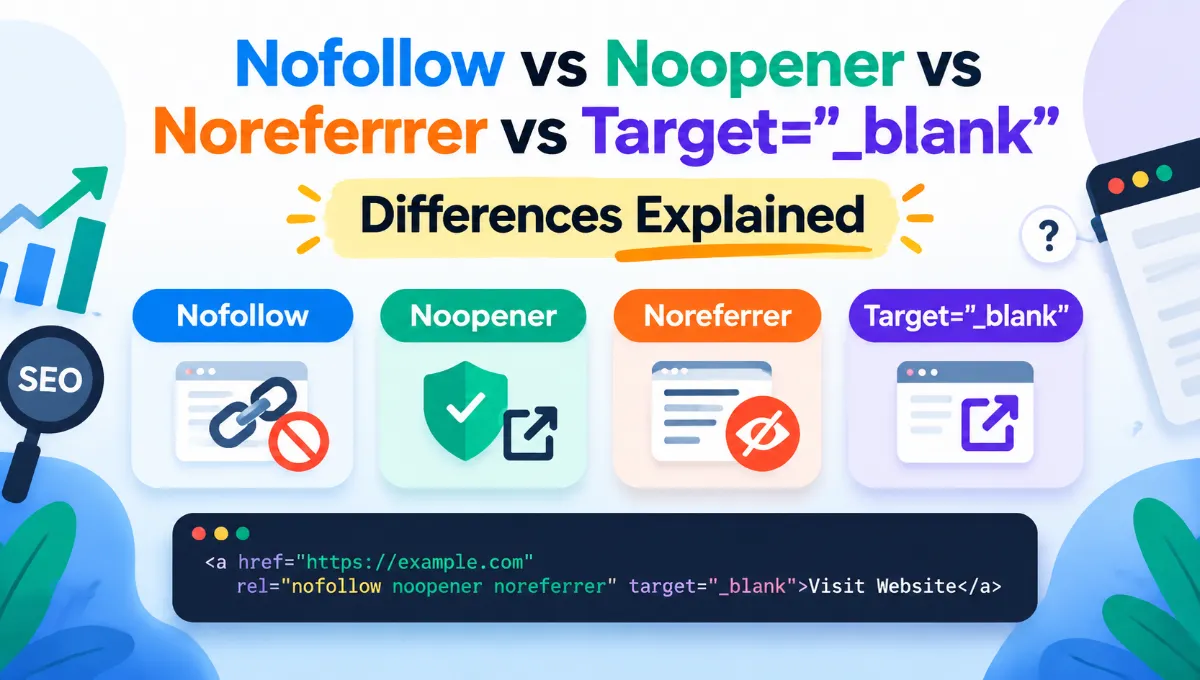
Quick answer: four attributes, four different jobs.
When adding external links to a website, you may have noticed HTML attributes such as rel="nofollow", rel="noopener", rel="noreferrer", and target="_blank".
At first glance, they might seem similar. After all, they often appear together inside the same HTML link.
However, each serves a different purpose. Some influence how search engines interpret links, others protect users from security risks, and one controls whether a link opens in a new browser tab.
Understanding these differences is important for SEO professionals, bloggers, web developers, and website owners.
For example, if you link to a competitor’s website using rel="noreferrer", will Google still recognize the backlink? Can the competitor see your domain in Google Search Console? Does opening a link in a new tab automatically make it nofollow?
Let’s explore how these HTML link attributes work, with practical examples involving two competing websites.
What Are HTML Link Attributes?
HTML link attributes provide additional instructions about how hyperlinks should behave.
A standard HTML link looks like this:
<a href="https://example.com">
  Visit Website
</a>
This link directs visitors to another webpage when clicked.
By default, a normal HTML link:
- Can be discovered and followed by search engines.
- May pass SEO ranking signals.
- Opens in the same browser tab.
- Generally sends referral information to the destination website, subject to browser referrer policies.
You can modify some of these behaviours using attributes such as nofollow, noopener, noreferrer, and target="_blank".
Although these attributes often appear together, they are not interchangeable.
1. What Is rel=”nofollow” in SEO?
The nofollow attribute tells search engines that the website owner does not want to endorse the linked page through that hyperlink.
Here is an example:
<a href="https://example.com"
   rel="nofollow">
  Visit Website
</a>
Originally, nofollow was introduced to help website owners deal with spammy links, particularly in blog comments and other user-generated content.
Today, it is also used when a website owner does not want to provide a normal ranking endorsement to another website.
Does nofollow stop Google from following a link?
Not necessarily.
Google treats nofollow as a hint rather than an absolute command.
This means Google may still discover the linked URL and use link information in certain circumstances.
A nofollow link also does not guarantee that the destination page will remain unindexed.
Does nofollow pass link juice?
In SEO, link juice is an informal term used to describe ranking value that links may pass between webpages.
A regular link can contribute ranking signals to its destination.
A nofollow link signals that the website owner does not want to pass a normal ranking endorsement.
However, because Google treats nofollow as a hint, it is inaccurate to say that nofollow links can never contribute to ranking signals.
When should you use nofollow?
Common situations include links that you do not want to endorse, certain untrusted external references, and links for which a normal editorial endorsement would be inappropriate.
For paid advertisements and sponsored placements, rel="sponsored" is generally the more appropriate attribute. For links in comments, forums, and similar user-generated sections, rel="ugc" can be used.
2. What Is rel=”noopener”?
The noopener attribute is primarily a security feature.
It is particularly relevant when links open in a new browser tab or window.
Example:
<a href="https://example.com"
   target="_blank"
   rel="noopener">
  Visit Website
</a>
When a website opens another page in a new tab, the newly opened page could historically access the original page through JavaScript’s window.opener property.
In some situations, this could create security risks.
The noopener attribute prevents the new page from accessing the original browsing context through window.opener.
Does noopener affect SEO?
No, not directly.
Using rel="noopener":
- Does not make a link nofollow.
- Does not prevent search engines from discovering the link.
- Does not instruct Google to ignore the backlink.
- Does not intentionally block referral information.
A link containing only rel="noopener" remains a normal link from an SEO perspective.
Modern browsers generally apply noopener-like protection automatically to links using target="_blank", but explicitly including the attribute is still clear and compatible with common development practices.
3. What Is rel=”noreferrer”?
The noreferrer attribute controls whether referral information is sent when a visitor follows a hyperlink.
Consider this example:
<a href="https://competitor.com"
   rel="noreferrer">
  Visit Competitor
</a>
When someone clicks the link, their browser navigates to the destination website without sending the HTTP Referer header for that navigation.
This means the destination website cannot identify the referring webpage through that header.
How does noreferrer affect Google Analytics?
Imagine your website is mydomain.com and you link to competitor.com.
Without noreferrer, the competitor’s analytics may record traffic from your website as referral traffic.
With noreferrer, that referral information is not sent.
As a result, the visit may appear as direct traffic in Google Analytics 4, assuming no other attribution signals are available.
However, UTM parameters, existing attribution information, and other tracking mechanisms can still identify the traffic source.
Important: noreferrer hides the HTTP referrer. It does not make a visitor anonymous or prevent all forms of tracking.
Does noreferrer affect SEO?
This is where confusion often arises.
The noreferrer attribute does not instruct Google to ignore the link.
It also does not automatically convert a dofollow link into a nofollow link.
Search engines can still discover a normal HTML hyperlink containing rel="noreferrer".
Therefore, the destination website may still receive backlink-related ranking signals.
4. What Is target=”_blank” in HTML?
Unlike the previous attributes, target="_blank" is not a rel value.
It controls where the linked page opens.
Example:
<a href="https://example.com"
   target="_blank">
  Visit Website
</a>
When a visitor clicks this link, the browser generally opens the destination in a new tab.
Without target="_blank", a normal hyperlink usually opens in the current tab.
Does target=”_blank” affect SEO?
No direct SEO ranking benefit or penalty is associated with opening a link in a new tab.
The attribute does not make a link dofollow or nofollow.
Its main purpose is to control browser navigation.
Opening links in new tabs can be useful in some situations, but it should be based on user experience rather than an assumption that it improves search rankings.
5. Nofollow vs Noopener vs Noreferrer vs Target=”_blank”
Here is a comparison of all four attributes.
| Attribute | Primary purpose | Direct SEO effect |
|---|---|---|
nofollow | Signals no ranking endorsement | Yes |
noopener | Protects the original browser tab | No |
noreferrer | Prevents sending the HTTP referrer | No direct ranking effect |
target="_blank" | Opens a link in a new tab/window | No |
Another important distinction is how these attributes influence referral tracking.
| Attribute | Hides HTTP referrer? | Makes link nofollow? |
|---|---|---|
nofollow | No | Yes |
noopener | No | No |
noreferrer | Yes | No |
target="_blank" | No | No |
These differences become easier to understand through a real-world SEO example.
6. Practical SEO Example: Your Website vs Competitor Website
Suppose two digital marketing agencies operate in the same industry.
Domain A — Your Website: https://mydomain.com
Domain B — Competitor Website: https://competitor.com
Both websites target similar SEO keywords and compete for organic search traffic.
You publish a blog post on Domain A titled:
“Top Digital Marketing Agencies in India”
Inside that article, you mention Domain B and include a hyperlink to the competitor’s website.
Let’s examine what happens under different conditions.
Scenario 1: A normal link without additional attributes
Your HTML:
<a href="https://competitor.com">
  Visit Competitor
</a>
Suppose your article receives 10,000 monthly visitors and 500 click the competitor’s link.
What happens?
First, those 500 visitors reach the competitor’s website.
Second, the competitor’s analytics may identify your website as a referral source.
Third, Google can discover the hyperlink when crawling your page.
Finally, the competitor may receive potential SEO ranking signals from the backlink.
The competitor might also discover your domain through backlink analysis tools or Google Search Console.
Scenario 2: Adding only rel=”noopener”
Now you modify the link:
<a href="https://competitor.com"
   target="_blank"
   rel="noopener">
  Visit Competitor
</a>
This time, the competitor’s website opens in a new tab.
The noopener attribute protects the original browser tab from access through window.opener.
However, the SEO behaviour remains essentially unchanged.
Google can still discover the link, and it remains eligible to pass ranking signals.
The competitor may also receive referral information from the browser.
Conclusion: noopener is a security attribute, not an SEO restriction.
Scenario 3: Adding only rel=”noreferrer”
Now consider:
<a href="https://competitor.com"
   rel="noreferrer">
  Visit Competitor
</a>
This creates a different situation.
When visitors move from Domain A to Domain B, their browsers do not send the HTTP Referer header.
The competitor’s analytics will not receive mydomain.com as the referring domain through that header.
However, the link remains a normal hyperlink from an SEO perspective.
Google can still discover it.
The competitor may still receive backlink ranking signals.
And most importantly, your domain may still appear in the competitor’s Google Search Console.
This leads to a particularly important question.
7. Can a Competitor See Your Domain in Google Search Console When You Use Noreferrer?
Yes. Your domain can still appear in the competitor’s Google Search Console under Top Linking Sites, even when your link contains rel="noreferrer".
Let’s understand why.
You have added this link to Domain A:
<a href="https://competitor.com"
   rel="noreferrer">
  Visit Competitor
</a>
Googlebot crawls your webpage and discovers the hyperlink pointing to Domain B.
Because noreferrer does not tell Google to ignore the hyperlink, Google can recognise the relationship between the two pages.
Now imagine the competitor opens Google Search Console and navigates to:
Links → External links → Top linking sites
Your domain, mydomain.com, may appear in that report.
Why?
Because Google Search Console’s link reporting is not based solely on the HTTP referral information that visitors send to websites.
Google discovers links through crawling and other search systems.
The noreferrer attribute does not hide a hyperlink from Google’s crawler.
What about Google Analytics?
Google Analytics and Google Search Console serve different purposes.
| Feature | Google Analytics 4 | Google Search Console |
|---|---|---|
| Main purpose | Visitor behaviour and acquisition | Search visibility and linking data |
| Effect of noreferrer | HTTP referrer unavailable | Backlink may still be reported |
| Can competitor identify your domain? | Not from the suppressed referrer alone | Potentially yes |
| Can the visit/link be recorded? | Yes | Yes, if Google discovers and reports the link |
There is one important limitation.
Google Search Console does not provide a complete list of every backlink Google has discovered.
Therefore, your domain appearing in the report is possible, but not guaranteed.
Likewise, third-party SEO tools may discover the backlink regardless of whether noreferrer is present.
The key lesson: Hiding referral information is not the same as hiding a backlink.
8. What Happens When You Combine Noopener, Noreferrer and Nofollow?
HTML allows multiple rel values on the same hyperlink.
For example:
<a href="https://competitor.com"
   target="_blank"
   rel="noopener noreferrer nofollow">
  Visit Competitor
</a>
Each value performs a different function.
noopener protects the original browsing context.
noreferrer prevents the browser from sending the HTTP referrer and also provides opener protection.
nofollow tells search engines that you do not want to endorse the linked page for ranking purposes.
Meanwhile, target="_blank" opens the destination in a new tab.
This combination can be useful when you want to open an external link in a new tab, suppress referral information, and avoid giving the link a normal ranking endorsement.
However, even this combination does not guarantee that the competitor cannot discover the link.
Search engines and backlink analysis platforms may still identify the hyperlink in your page’s HTML.
9. Is rel=”noreferrer” the Same as rel=”nofollow”?
No. These two attributes solve completely different problems.
Consider these two links:
Example A: Noreferrer
<a href="https://competitor.com"
   rel="noreferrer">
  Competitor Website
</a>
This link suppresses the HTTP referrer but remains eligible to pass ranking signals.
Example B: Nofollow
<a href="https://competitor.com"
   rel="nofollow">
  Competitor Website
</a>
This link signals that you do not want to endorse the destination for ranking purposes.
However, it does not suppress referral information.
A visitor clicking Example B can still be identified as coming from your website through normal referral tracking.
This is why treating noreferrer and nofollow as interchangeable can lead to incorrect SEO decisions.
10. Does rel=”noreferrer” Stop Backlinks From Appearing in Ahrefs or Semrush?
No.
Backlink analysis tools discover links by crawling webpages and analysing their HTML.
If your webpage contains a hyperlink to another domain, those tools may identify it.
For example:
<a href="https://competitor.com"
   rel="noreferrer">
  Read More
</a>
Even though the browser does not send the HTTP referrer during navigation, the hyperlink remains visible in the HTML.
A backlink crawler may discover:
- The referring domain.
- The referring page URL.
- The destination URL.
- The anchor text.
- The link’s
relattributes.
Whether the backlink actually appears in a particular tool depends on its crawling coverage, processing, and reporting.
Adding noreferrer does not make the backlink private.
11. Which Link Attributes Should You Use for SEO?
There is no single combination that is appropriate for every external link.
The right choice depends on why you are linking to another website.
For a normal editorial link to a trustworthy resource, you generally do not need nofollow.
If you want the link to open in a new tab, target="_blank" can be used, with noopener for explicit opener protection.
If you want to prevent the destination from receiving the HTTP referrer, use noreferrer.
If you do not want to provide a normal ranking endorsement, use nofollow where appropriate.
Adding these attributes by hand to every link in a long draft is slow. If you are pasting content from Word or Google Docs, an HTML code converter can keep your links and apply target="_blank" or rel="nofollow" through its “Open links in new tab” and “Add nofollow” options.
For paid links, use sponsored. For relevant user-generated links, consider ugc.
Avoid adding nofollow to every external link simply because it points away from your website. Linking to useful, relevant resources is a normal part of publishing helpful content.
Similarly, do not add noreferrer to every external link without considering its effect on legitimate referral tracking and attribution.
12. Common Mistakes to Avoid
Mistake 1: Assuming noopener means nofollow
A link containing rel="noopener" is not automatically nofollow.
Mistake 2: Believing noreferrer hides backlinks from Google
Noreferrer suppresses the HTTP referrer, not the hyperlink itself.
Mistake 3: Thinking target=”_blank” improves Google rankings
Opening links in new tabs does not provide a direct ranking advantage.
Mistake 4: Assuming nofollow prevents Google from discovering a URL
Nofollow is a link qualification hint, not a reliable method for blocking crawling or indexing.
Mistake 5: Using noreferrer to hide competitor backlinks
A competitor may still discover your link through Google Search Console or backlink analysis tools.
Mistake 6: Treating every external link as an SEO risk
Relevant external links can improve the usefulness of content. Link attributes should reflect the nature and purpose of the link, rather than being applied automatically out of fear of losing rankings.
Frequently Asked Questions
Is rel=”noopener” dofollow or nofollow?
A link containing only rel="noopener" remains a normal, followable hyperlink. Noopener is a security attribute and does not make the link nofollow.
Does rel=”noreferrer” pass link juice?
A link with only rel="noreferrer" remains eligible to pass SEO ranking signals. Noreferrer does not instruct Google to withhold ranking credit.
Can Google Search Console detect noreferrer backlinks?
Yes. Google can discover hyperlinks containing rel="noreferrer". Such links may appear in Google Search Console’s external link reports, although reporting is not exhaustive.
Does target=”_blank” automatically add nofollow?
No. target="_blank" controls where a hyperlink opens. It does not change the link’s SEO endorsement status.
Is rel=”noopener noreferrer” good for SEO?
It is a valid combination for security and referrer privacy. It does not directly improve rankings or automatically make a link nofollow.
What is the difference between noreferrer and nofollow?
Noreferrer prevents the browser from sending the HTTP referrer during navigation. Nofollow signals that search engines should not treat the link as a normal ranking endorsement.
Can competitors find my backlinks if I use noreferrer?
Yes. Competitors may discover the link through Google Search Console, backlink analysis tools, or by examining your webpage’s HTML.
Which Link Attributes Should You Use for External Links?
Generally, for external links, it is common to use rel="noopener nofollow" with target="_blank". This opens the external website in a new tab, provides browser security protection, and tells search engines not to treat the link as a normal ranking endorsement. You can create links with these attributes quickly using a hyperlink HTML generator.
Final Thoughts
The difference between nofollow, noopener, noreferrer, and target="_blank" becomes straightforward once you understand what each attribute controls.
Nofollow is about search engine link endorsement. Noopener is about browser security. Noreferrer is about referral privacy. Target blank is about opening links in new tabs or windows.
For SEO professionals, one of the most important distinctions is between referral tracking and backlink discovery.
A competitor might not see your website as a referral source in Google Analytics when you use noreferrer, but Google may still discover the backlink and report your domain in Search Console.
Choosing the right link attributes means understanding both the technical behaviour and the purpose of the hyperlink.
Use them deliberately, keep links useful for readers, and avoid assuming that a browser privacy attribute automatically changes how search engines evaluate backlinks.